Scripts
Every script you are working on, one tap from any scene.
Upload a PDF, Word document, Final Draft file or Fountain script and Off-Book reads it into scenes, characters and dialogue. Then it is a script you can read properly on a phone, jump around in, and rehearse, action and learn from.
Why a script reader built for actors
A PDF on a phone is a page you pinch and drag. Off-Book reads the script into what it actually is, scenes and speeches and directions, and sets it as a clean page in Courier that reflows to your screen.
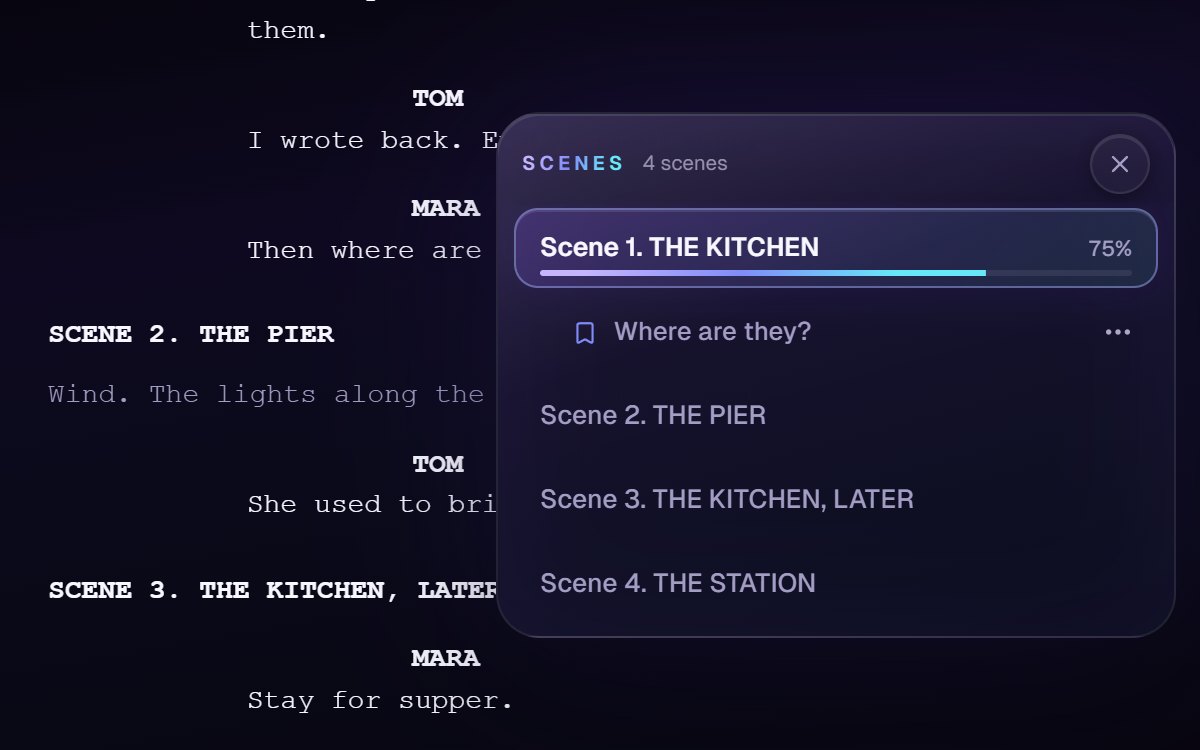
Scene Jump sits on the edge of the page: every scene in the play, and the pages before it such as the cast list, one tap from wherever you are, with how far through each scene you have got. Drop a checkpoint where you stopped and come straight back to it.
Reading mode is comfort for your eyes: the start of each word in bold, which some readers, including some with dyslexia or ADHD, find easier to follow; the OpenDyslexic typeface; and a text size from 85% to 200%. The words themselves never change. A long speech on its own is found and treated as a monologue, folders keep each project’s scripts together, and everything else in Off-Book starts from the same script.
How it works
Upload
PDF, Word (DOCX), Final Draft (FDX) or Fountain. Off-Book finds the scenes, the characters and every speech.
Read it properly
A clean, reflowing page on any screen, with the text size you want.
Jump and mark
Scene Jump to any scene, see how far through each one you are, and leave a checkpoint to come back to.
Work from it
Rehearse, action, break into units and quiz from the same script.
Questions actors ask
It works with the rest of Off-Book