Performance Voices
A cast for your scene, not one narrator.
In the Rehearsal Studio, Off-Book reads every part that isn’t yours. Performance Voices is how those parts sound: before the scene starts you give each character a voice, hear it with one tap, and save the ones you like.
Why a scene needs more than one voice
Listening is half of acting, and you listen differently to different people. A cue from a weary father and a cue from a nervy kid should land differently on you, and when every part is read in one voice the scene flattens into a single tone you have nothing to push against.
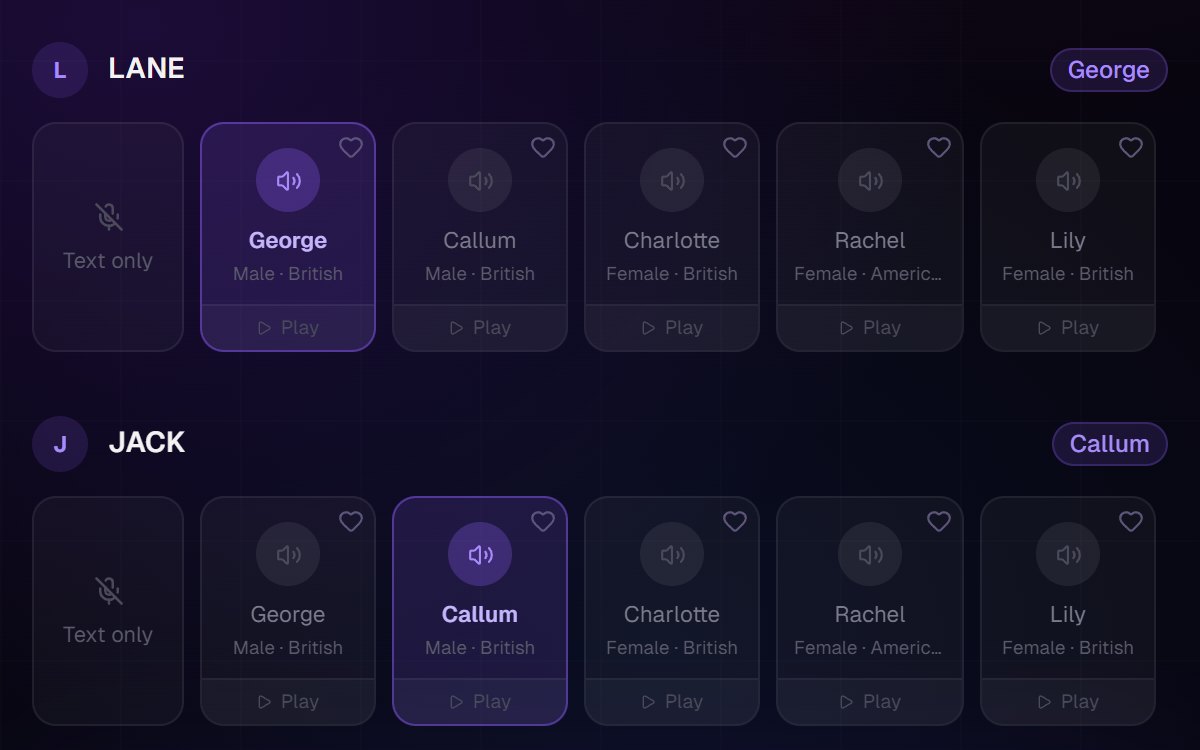
So every other character gets a voice of their own. Each one is shown with who it sounds like, and a tap on Play lets you hear it before you choose. Heart the ones that suit the parts you play, and they are kept for the next scene.
It is there to give you something to answer, not to perform the scene for you. Your part is never read aloud; it stays yours.
How you cast a scene
Choose your scene and your part
In the Rehearsal Studio, pick the script, the scene and who you are playing.
Give every other part a voice
Each character gets a row of voices. Tap Play to hear one, tap the card to give it the part, or choose text only.
Keep the ones you like
Heart a voice and it is saved, so the parts you cast often are a tap away next time.
Rehearse
The scene starts, and each part comes in on cue in the voice you gave it.
Questions actors ask
It works with the rest of Off-Book